Lab — Hands-on Exercise
Covid 2020 Analytics
Master essential DAX techniques, date modeling, time intelligence, running totals, and dual-axis combo visuals by analyzing the global spread of COVID-19 in 2020.
You are working as a Public Health Data Analyst tasked with tracking national and global pandemic indicators for the year 2020. You have daily case, fatality, and population statistics across hundreds of territories. Your objective is to build an interactive Power BI dashboard featuring cumulative running totals, infection rates adjusted for population size, and month-over-month variances.
Target Dashboard
Review the target layout below. Your goal is to recreate this interactive dashboard showing executive KPI cards, dropdown slicers for country and month, and a dual-axis running totals chart.
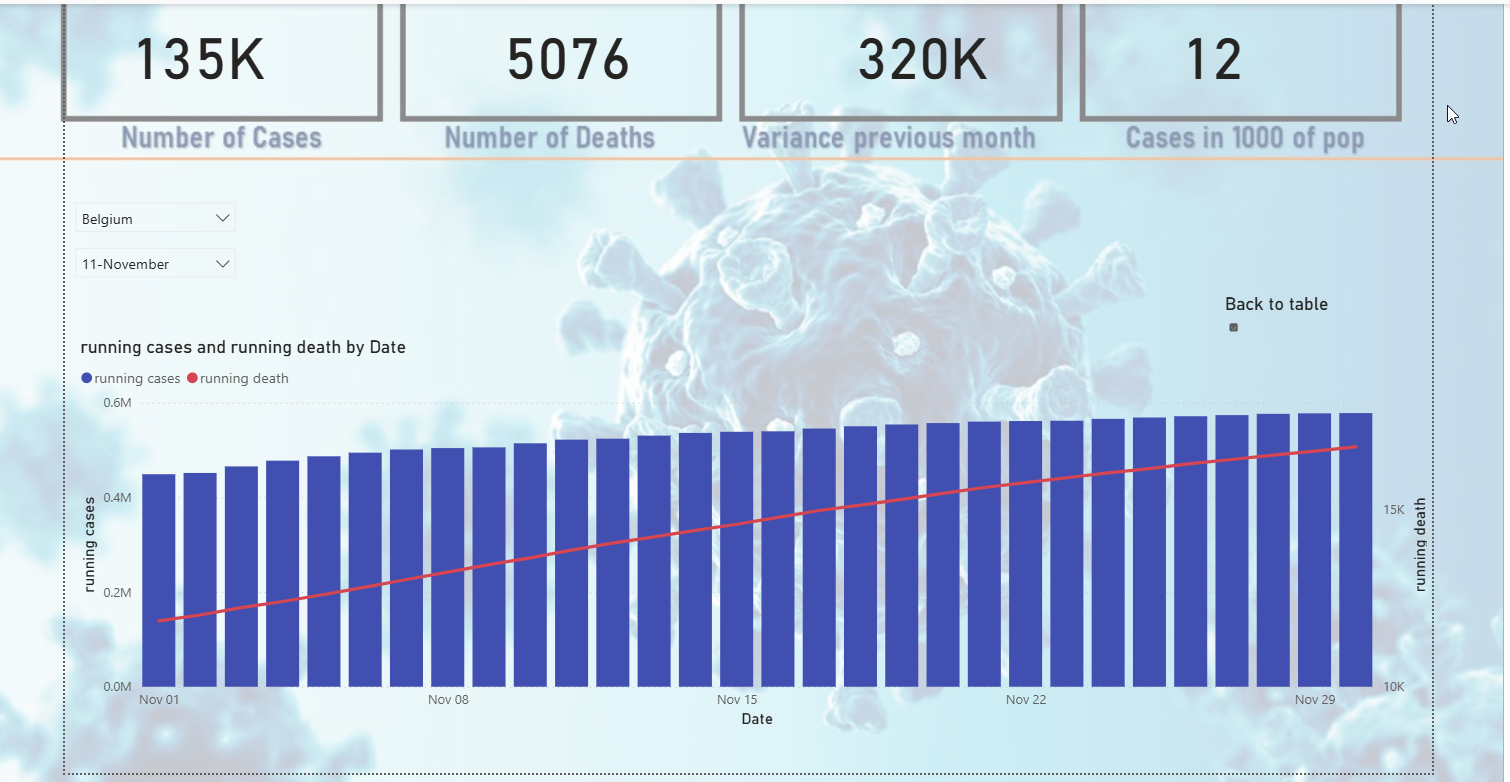
The target report view: Belgium filtered for 11-November, displaying top metrics and the running cases vs. deaths timeline.
Dataset Structure
The dataset is stored in datafiles/Covid 2020.xlsb. Key fields used throughout the lab include:
| Field Name | Type | Description & Role |
|---|---|---|
| dateRep | Date | Daily date reported (e.g. 01/01/2020). Linked to the Calendar table. |
| cases | Integer | New daily confirmed positive cases. Aggregated for running totals. |
| deaths | Integer | New daily confirmed fatalities. Aggregated for cumulative mortality curves. |
| countriesAndTerritories | Text | Country or territory name (e.g. Belgium, Afghanistan). Used in the Country slicer. |
| popData2019 | Integer | Total population in 2019. Used to compute normalized infection rates per 1,000 citizens. |
| geoId / countryterritoryCode | Text | Two- and three-letter standard country codes. |
1
Setup & Load the Data
Import the Excel workbook and rename the table
Open Power BI Desktop. Click Get Data → Excel Workbook and select
Covid 2020.xlsb.
In the Navigator dialog, check the sheet named
COVID-19-geographic-disbtributi.
Click Transform Data to open Power Query Editor. In the query settings pane on the right, rename the query to covid so all DAX formulas reference
covid[...] seamlessly.
Verify that the column
dateRep is detected as a Date data type. If necessary, click the data type icon in the header and set it to Date.
Click Close & Apply in the ribbon to load the table into the data model.
2
Create Calendar Table & Relationships
Generate a contiguous date dimension and month column
Go to Modeling → New Table and create the calendar table using
CALENDARAUTO():
calendar = CALENDARAUTO()
In the newly created calendar table, click New Column to format the month as
"mm-mmmm" (e.g. 11-November):
month = FORMAT('calendar'[Date], "mm-mmmm")
Switch to Model View. Drag
'calendar'[Date] to connect it to 'covid'[dateRep], creating an active one-to-many relationship (1 : *) with single cross-filter direction.
3
Create DAX Measures
Running totals, time intelligence, and rate calculations
Create a new measure for running death (cumulative fatalities):
running death = CALCULATE(
SUM(covid[deaths]),
FILTER(
ALL('calendar'),
'calendar'[Date] <= MAX('calendar'[Date])
)
)
SUM(covid[deaths]),
FILTER(
ALL('calendar'),
'calendar'[Date] <= MAX('calendar'[Date])
)
)
Create a new measure for running cases (cumulative confirmed cases):
running cases = CALCULATE(
SUM(covid[cases]),
FILTER(
ALL('calendar'),
'calendar'[Date] <= MAX('calendar'[Date])
)
)
SUM(covid[cases]),
FILTER(
ALL('calendar'),
'calendar'[Date] <= MAX('calendar'[Date])
)
)
Create a new measure for per 1000 to calculate infected cases per 1,000 population:
per 1000 = 1000 * SUM(covid[cases]) / MAX(covid[popData2019])
Create a new measure for last month using
DATEADD for time intelligence comparisons:
last month = CALCULATE(
SUM(covid[cases]),
DATEADD('calendar'[Date], -1, MONTH)
)
SUM(covid[cases]),
DATEADD('calendar'[Date], -1, MONTH)
)
Create a helper measure for Variance previous month (or display
last month in the summary card):
Variance previous month = SUM(covid[cases]) - [last month]
4
Build Top KPI Summary Cards
Header metric cards providing instant summary totals
Insert 4 Card visuals across the top row of your report canvas.
Card 1 — Number of Cases: Add
covid[cases] (Sum) and set the title or category label to Number of Cases.
Card 2 — Number of Deaths: Add
covid[deaths] (Sum) and set the title or category label to Number of Deaths.
Card 3 — Variance previous month: Add the
[Variance previous month] measure (or [last month]) and label it Variance previous month.
Card 4 — Cases in 1000 of pop: Add the
[per 1000] measure and format display units to integer (e.g. 12 for Belgium in November).
5
Add Interactive Slicers
Filter the dashboard dynamically by country and month
Country Slicer: Insert a Slicer visual, add
covid[countriesAndTerritories], and switch the slicer style to Dropdown in Format → Slicer settings.
Month Slicer: Insert a second Slicer visual, add
'calendar'[month], and set its style to Dropdown.
Position both slicers cleanly on the left side below the KPI cards, ready for multi-month or country selection.
6
Build Line and Column Chart
Dual-axis visualization of running cases and running deaths
Insert a Line and clustered column chart onto the canvas.
X-axis: Add
'calendar'[Date] (select Date, not hierarchy, or drill to daily level).
Column Y-axis: Add the
[running cases] measure.
Line Y-axis: Add the
[running death] measure.
In Format visual → General → Title, set the text to running cases and running death by Date.
Configure series colors: set the column bars to Royal Blue and the running death line to Red / Coral.
Optional
Add a back navigation button (e.g. "Back to table") or button icon in the top right above the chart area.
7
Formatting & Final Verification
Borders, alignment, and verifying calculations
Select Belgium in the Country slicer and 11-November in the Month slicer.
Verify your visual outputs match the reference screenshot:
- Number of Cases: ~135K
- Number of Deaths: ~5,076
- Variance previous month: ~320K
- Cases in 1000 of pop: ~12
- Chart timeline: November 1st to November 30th showing steady cumulative progression.
Apply subtle borders and uniform card padding to achieve a clean presentation. Save the file as Covid 2020.pbix.
DAX Quick Reference
All DAX tables, calculated columns, and measures used in this lab.
calendar (Calculated Table)
Calculated Table
calendar = CALENDARAUTO()
month (Calculated Column)
Calculated Column
month = FORMAT('calendar'[Date], "mm-mmmm")
running death
Measure
running death = CALCULATE(
SUM(covid[deaths]),
FILTER(
ALL('calendar'),
'calendar'[Date] <= MAX('calendar'[Date])
)
)
SUM(covid[deaths]),
FILTER(
ALL('calendar'),
'calendar'[Date] <= MAX('calendar'[Date])
)
)
running cases
Measure
running cases = CALCULATE(
SUM(covid[cases]),
FILTER(
ALL('calendar'),
'calendar'[Date] <= MAX('calendar'[Date])
)
)
SUM(covid[cases]),
FILTER(
ALL('calendar'),
'calendar'[Date] <= MAX('calendar'[Date])
)
)
per 1000
Measure
per 1000 = 1000 * SUM(covid[cases]) / MAX(covid[popData2019])
last month
Measure
last month = CALCULATE(
SUM(covid[cases]),
DATEADD('calendar'[Date], -1, MONTH)
)
SUM(covid[cases]),
DATEADD('calendar'[Date], -1, MONTH)
)
Variance previous month
Measure
Variance previous month = SUM(covid[cases]) - [last month]